UGR<19 is the number everyone prints, and almost nobody proves in your actual room. Here’s how glare really shows up—and how to design, specify, and verify UGR19 office lighting like you expect disputes.
Because if you “save” money with a bright retrofitted troffer, a skinny luminous aperture, and a diffuser that looks good in a cut sheet, you pay later—complaints, screen reflections, re-aiming, add-on films, and that awkward email thread where everyone pretends they don’t remember who approved the fixture schedule.
And why does this keep happening?
Table of Contents
The hard truth: “UGR<19” is usually a paper promise, not a room outcome
UGR is a calculation that lives inside assumptions: room size, reflectances (often 70/50/20), observer positions, luminaire photometry, and the idea that the luminous surface is uniform. The minute you swap optics, change ceiling height, add glossy desks, or pack 8,000+ lumens into a fixture with a smaller bright center, your “UGR<19” badge turns into a coin flip.
Here’s a clean example of the industry’s self-own: the U.S. General Services Administration warns that some tube-LED retrofit paths “rely on optics of existing troffer” and the downside is blunt—“glare and distribution.” That’s government-speak for “you will get complaints.”
The UGR<19 target: what it is (and what it isn’t)
If you’re designing under EN 12464-1, you’re not just chasing lux; you’re also expected to manage discomfort glare, veiling reflections, flicker, and DSE (display screen equipment) conditions. The 2021 revision explicitly calls out verification procedures for Unified Glare Rating, and even adds guidance for “non-standard” UGR situations—because real rooms don’t behave like the manufacturer’s demo box.
So when I say “UGR19 office lighting,” I mean something stricter than marketing:
the fixture’s photometry holds up in your geometry,
the luminous surface doesn’t produce hotspots,
the layout doesn’t put bright sources at bad angles relative to screens,
and you can defend it with files, not vibes.
Why offices fail glare tests even when the spec says UGR<19
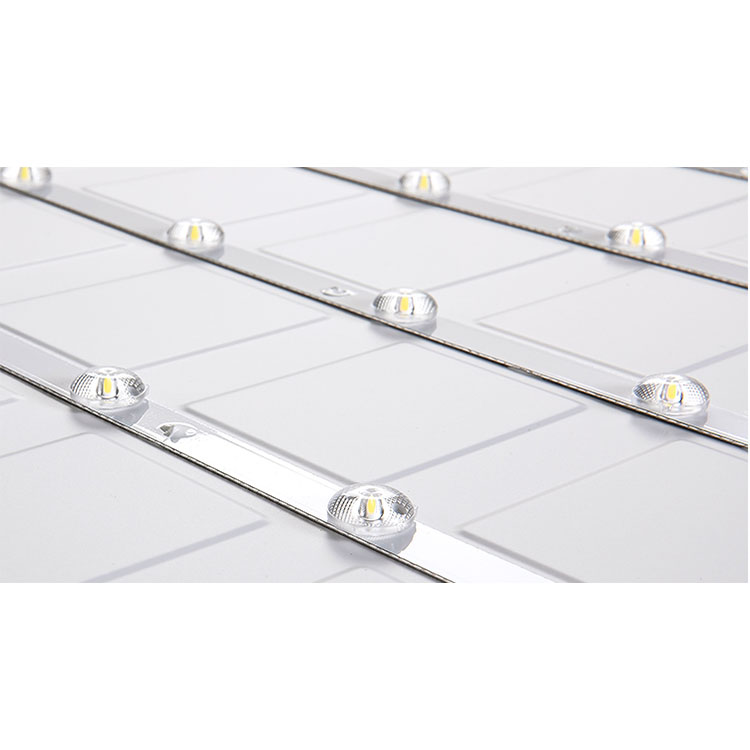
Short sentence. Hotspots ruin comfort. A “UGR<19” panel can still feel harsh if the emitting area is smaller than the fixture face, or if the optic creates localized high luminance zones that the UGR model underweights.
California Energy Commission researchers put it plainly in a 2023 technical report: commercial troffers often ship in high-output packages (including outliers above 8,000 lumens), and those high-lumen packages can be perceived as glare, especially with low mounting heights (typically 8’–12′).
That one paragraph explains about 80% of the complaints I see in post-occupancy reports: you can meet target illuminance and still lose the room because the luminous surface is too intense, too small, or too non-uniform.
The optics that actually move the needle (and the ones that don’t)
1 Microprismatic diffuser (good—when it’s real, not “patterned plastic”)
A true microprismatic optic can reduce high-angle luminance (the stuff that nails you when you glance up from a monitor). But microprismatic also has a dirty secret: cheap prisms sparkle, and sparkle reads as “glare” to sensitive users, even if the UGR table looks fine.
If you’re sourcing, don’t just ask “UGR<19?” Ask for:
the UGR table conditions (room index, reflectances),
the IES/LDT photometry (so you can run DIALux/AGi32 yourself),
and a luminance view (cd/m² heatmap) if they have it.
If you need submittal-ready documentation fast, start from your project files pipeline: LED lighting IES/LDT photometrics and submittal resources is the kind of link you hand to your team when you’re done arguing and want to simulate.
2 Louvers / grille optics (best when screens dominate the room)
Grille luminaires work because they block problematic angles and hide the LED package deeper in the optic. In open offices with wall-mounted displays and glossy laptops everywhere, this is often the least-bad answer.
For reference when you’re building fixture alternates:
3 “Opal diffuser” panels (fine for softness, risky for UGR marketing claims)
Opal can look pleasant, but if the panel is driven hard—high wattage, tight emitting area—you’re back to the same complaint cycle. Opal masks point sources; it doesn’t magically eliminate high luminance at critical angles.
Layout: the part everyone skips, and then regrets
Three words. Angles matter more. A fixture with good photometry can still fail if you park it in the wrong location relative to viewing direction and screen tilt, because discomfort glare is positional—by definition.
In a U.S. DOE experiment on “position index” (a key component in discomfort-glare modeling), researchers varied source position and showed overhead sources at steep angles can be detected and quantified, and that the modeling needs to account for bias and geometry properly. Translation for designers: geometry is not optional.
Practical layout rules I actually trust:
Keep high-luminance apertures out of the primary line-of-sight cones for seated work (screens + heads-down tasks).
Use larger luminous areas at lower luminance, rather than smaller apertures at higher luminance (you’ll feel the difference even before you calculate it).
Don’t over-pack lumens into low ceilings. The CEC report’s 8’–12′ troffer heights are exactly where offices live, and exactly where glare becomes personal.
CCT, spectrum, and the “cool white” trap
I’m going to say the unpopular part: the industry still treats CCT like a design personality test (“modern = 5000K”), and ignores that glare sensitivity is not purely about brightness.
A 2024 IEA 4E review on health effects and solid-state lighting notes that discomfort glare complaints show up fast, that small/high-intensity LED sources can create high luminance contrasts, and that spectral power distribution can influence discomfort glare—especially higher short-wavelength content—while also admitting there’s not full consensus yet.
Meanwhile, federal building guidance from GSA/PNNL says most occupants prefer warmer temperatures—3000K and 3500K are common—and flags flicker risk tied to driver frequency and waveform shape. That’s not “aesthetic”; that’s occupant comfort and headaches.
Controls: energy wins don’t excuse glare losses
Controls save energy. True. But they don’t fix bad luminance distribution.
GSA’s 2024 guidance makes the point that controls can bring significant savings, yet ROI can be tricky because LED is already efficient; it also references DOE case studies showing HVAC savings >20% when HVAC integration is done via networked lighting/occupancy sensing. That’s meaningful—but only if you didn’t torch visual comfort in the base design.
A reality-based fixture selection path (UGR<19 edition)
If you’re buying from a catalog, you’ll drift into the same bad defaults. I’d rather you shop by proof.
Pick the luminaire family by application
Large open offices: consider grille or deep-optic linear systems (screen-heavy rooms reward shielding).
Private offices + meeting rooms: low-luminance panels can work if you validate angles.
Mixed-use: layer with downlights only where you can control beam direction and luminance.
Useful starting points for office-type fixtures and families:
Simulate, then sanity-check DIALux/Relux/AGi32: calculate UGR, illuminance, uniformity, and look for luminance hotspots in renderings. If the manufacturer claims “UGR<19” but won’t provide photometry, treat that like a missing structural calc.
Keep your spec defensible This is the “investigative journalist” moment: you’re not writing for a brochure; you’re writing for the email thread that appears after the first week of occupancy.
Comparison table: where UGR projects usually go right (or wrong)
Approach
Typical upside
Typical failure mode
When I’d use it
Microprismatic UGR<19 LED panel
Good high-angle control; familiar form factor
Sparkle/“glitter” from low-quality prisms; UGR table doesn’t match your room
Standard offices with disciplined layout + verified photometry
Opal diffuser panel
Soft appearance; hides point sources
If driven hard (high lumen density), it still reads as glare; “bright center” issues
Low ceilings only if lumen package is moderated
Linear grille / louver luminaires
Strong shielding for DSE; good visual comfort
Bad spacing can create striping; poor wall/ceiling reflectance amplifies contrast
Open-plan offices and screen-heavy layouts
Tube-LED troffer retrofits (keep old housing)
Cheap first cost
Documented risk: glare + bad distribution because you inherit old optics
Only when budget is king and complaints are tolerated
Large-area uniform emitters (diffuse panels)
Intrinsically less discomfort glare than small intense sources
Needs good efficacy + thermal design; cheap versions yellow or sag
Where comfort is contract-critical
FAQs (AEO / Featured Snippet targeting)
What is UGR, and what does UGR<19 mean in offices?
UGR (Unified Glare Rating) is a calculated index of discomfort glare from electric luminaires in a defined room, based on source luminance, apparent size, background luminance, and position in the viewer’s field; UGR<19 means the design’s worst observer position stays below 19 in that standard geometry. In plain terms: it’s a ceiling on “how annoying the lighting feels” for typical viewing directions, especially for screen work.
Is UGR<19 required by EN 12464-1 for office lighting?
EN 12464-1 is a European indoor workplace lighting standard that includes discomfort-glare management, DSE workstation considerations, and formal verification procedures (including Unified Glare Rating), and it is implemented through national standards bodies across many countries, replacing older editions and clarifying glare usability. Whether it becomes a legal obligation depends on how your country ties workplace requirements to standards, but in tenders it’s often treated as non-negotiable.
How do microprismatic diffusers help achieve UGR<19?
A microprismatic diffuser is an optical layer engineered to redirect and spread light so high-angle luminance is reduced, which lowers discomfort glare in typical observer positions and can improve UGR results when paired with correct photometry, mounting height, and room reflectances used in the UGR tabular method. The warning: low-grade prisms can introduce sparkle, and users complain even when the math looks okay.
How do I verify UGR<19 in a real office, not just on a datasheet?
Verifying UGR<19 means confirming the luminaire photometry and layout in your specific room geometry and viewing directions, because discomfort-glare modeling depends on source position relative to line of sight, background luminance, and the room’s assumptions—so you validate with UGR tables plus IES/LDT simulation, not a single marketing line. Start with simulation (DIALux/Relux/AGi32). Then do a post-install walk-through at desk height with screens on.
Why do bright LED troffers cause glare complaints even when lighting levels are “correct”?
High-output troffers can trigger glare complaints because large lumen packages at common office ceiling heights (often 8’–12′) raise perceived brightness and luminance contrast, and when the luminous area is smaller or non-uniform within the fixture, occupants perceive hotspots and discomfort even if average illuminance meets spec targets. This is why “more lumens” is not a comfort strategy.
Does color temperature affect glare perception?
Color temperature and spectrum can influence discomfort glare perception because short-wavelength-heavy (“cool white”) LEDs may be experienced as more glary in some conditions, and large reviews note both luminance contrast and spectral power distribution as contributors—even while acknowledging research disagreement on exact magnitude and modeling. If you’re designing for comfort-first offices, 3000K–3500K is often the safer default in occupant preference guidance.
Conclusion: Want a UGR<19 design you can defend?
If you’re serious about UGR19 office lighting, stop buying claims and start buying proof files. Send your ceiling plan, ceiling height, target lux (e.g., 500 lx), and the fixtures you’re considering—and get the IES/LDT + cut sheets you need to run the model and lock the submittal.